
YouCompose: Creative Music Composition for iPhone
Overview
YouCompose is a dedicated music composition tool designed for iPhone users seeking a portable and intuitive way to create original music. Developed by Wout Bremer, this application falls within the Music & Radio category and is tailored for musicians, composers, and creative individuals who want to explore music-making on a mobile platform. The app supports iOS 16.4 and above, ensuring compatibility with modern iPhone devices. It is available in English and currently operates as a free download, making it accessible to a broad audience of music enthusiasts.
The software is ideal for users who need a lightweight yet powerful tool to sketch melodies, experiment with chord progressions, or build full compositions on the go. Whether composing in a studio, during travel, or in a quiet moment at home, YouCompose enables spontaneous creativity without requiring complex setups. Its full version status means all core features are included without trial limitations or in-app purchases, offering a complete experience from the start. The app was released on November 30, 2023, and has been published on Softonic, where users are encouraged to provide feedback and ratings to help improve community insights.
Key Features & Capabilities
- Intuitive Composition Interface – Designed for ease of use, the interface allows users to create and edit musical ideas through simple gestures and visual feedback, suitable for both beginners and experienced composers.
- Real-Time Music Playback – Compositions can be played back instantly, enabling immediate listening and refinement of melodies, rhythms, and harmonic structures.
- Chord and Melody Tools – Built-in tools support the creation and manipulation of chords and melodic lines, helping users explore harmonic progressions and develop musical themes.
- Project Saving and Organization – Users can save multiple projects, organize them efficiently, and return to work at any time, preserving creative progress.
- Full Version Access – The app is distributed as a complete version with no feature restrictions, ensuring full functionality from installation.
These features support a wide range of creative workflows, from initial idea capture to structured composition. For example, a composer might use the chord tools to build a progression, then layer a melody on top, adjusting timing and dynamics in real time. The ability to save and revisit projects makes it suitable for long-term music development, even across multiple sessions. The app’s focus on simplicity and direct access to core tools ensures that users remain immersed in the creative process without distractions.
User Interface, Workflow & Performance
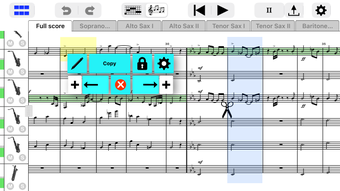
YouCompose features a clean, minimalist interface optimized for touch-based interaction on iPhone. Navigation is streamlined, allowing users to access core functions with minimal taps. The layout prioritizes clarity, with visual cues guiding users through composition tasks such as note entry, tempo adjustment, and playback control. The workflow is designed to be efficient, enabling quick transitions between idea creation, editing, and playback.
Performance details were not specified by the developer. However, based on the app’s size of 100.2 MB and its categorization as a music composition tool, it is likely optimized for smooth operation on supported iOS devices. The developer did not provide information on CPU or RAM usage, nor did they share stability metrics. General expectations for such applications suggest consistent responsiveness during playback and editing, especially on devices running iOS 16.4 or higher. The absence of reported issues in initial listings indicates a stable baseline experience, though real-world performance may vary depending on device capabilities and project complexity.
Compatibility & System Requirements
YouCompose is designed exclusively for iOS devices and requires a minimum of iOS 16.4 to function. This ensures compatibility with recent iPhone models, including the iPhone 11 and later, as well as compatible iPad devices. The app has a file size of 100.2 MB, which is relatively modest for a full-featured music application, suggesting efficient resource management.
Exact system requirements were not listed beyond the operating system version. The developer did not specify minimum hardware specifications such as processor speed, RAM, or storage capacity beyond the base OS requirement. As such, users should ensure their device meets the iOS 16.4 threshold and has sufficient free space for the app and saved projects. Compatibility information is limited to the OS version, so users of older devices or non-iOS platforms should consult their device’s compatibility status before downloading.
Pros and Cons
Pros
- Full version available with no trial restrictions or in-app purchases
- Intuitive interface tailored for touch-based music creation
- Real-time playback for immediate creative feedback
- Lightweight size (100.2 MB) for efficient storage use
- Free to download and use, with no cost barrier to entry
Cons
- No information provided on advanced features or export options
- Compatibility limited to iOS 16.4 and above
- Developer did not share details on performance or resource usage
- Only available in English
- Limited public feedback due to recent release
FAQ Section
Is YouCompose available for Android or Mac?
YouCompose is designed exclusively for iOS devices. There is no version available for Android or Mac at this time.
Is the app safe to download and use?
Yes, the app is published on Softonic, a reputable software platform. It is available as a free download and has not been flagged for security issues. Users should ensure they download from official sources.
Does YouCompose require an internet connection?
The app functions fully offline. All composition, playback, and project management features are available without an internet connection.
How often are updates released?
Specific update frequency was not provided. The current version is 7.21, released on November 30, 2023. Future updates may be released to improve performance or add features.
Can I export my compositions from YouCompose?
Export functionality was not specified. The developer did not provide details on file formats or sharing options.
Final Thoughts
YouCompose stands out as a promising music composition tool for iPhone users who value accessibility and creative freedom. Its full version release, combined with a free price point, makes it an attractive option for composers and hobbyists alike. The intuitive interface and real-time playback support a fluid creative workflow, ideal for capturing musical ideas on the move. While some details such as export options and performance metrics remain undisclosed, the app’s clean design and focus on core composition tasks suggest a reliable experience for its target audience.
For musicians seeking a lightweight, no-cost solution to start or continue their creative process, YouCompose delivers a compelling package. Its compatibility with modern iOS devices and minimal storage footprint further enhance its appeal. With growing user feedback expected, this app has strong potential to become a go-to tool for mobile music creation.
Download YouCompose now







